REVIEW · VERONA
Verona Audioguide – TravelMate app for your smartphone
Book on GetYourGuide →Operated by MyWoWo Srl · Bookable on GetYourGuide
Verona is easier when it’s on your phone. This TravelMate audioguide gives you 21 professionally made tracks (63 minutes total) so you can learn at your pace, with offline listening and no paper tickets to collect. One $9 ticket can keep paying off whenever you want to revisit the city.
The one drawback is that this is a self-guided experience: you’ll rely on your smartphone setup and the activation code you retrieve from your email (or the GetYourGuide app).
In This Review
- Key Highlights at a Glance
- Verona Audioguide With TravelMate: How Autonomy Feels in Real Life
- Getting Started Quickly: Downloading TravelMate and Finding Your Code
- Offline-Ready Audio for 1365 Days: Your Listening Setup
- The Route in 21 Audio Tracks: What You’ll Cover in Verona
- Verona Introduction
- Arenabasilica of San Zeno
- Basilica of Santa Anastasiа
- Castelvecchio
- Cathedral
- Old Town
- Oltre Adige
- The Wonders of Local Cuisine
- Quiz Section: Learning Without Feeling Like Studying
- Price and Value: Is $9 a Good Deal for Verona?
- Practical Listening Tips That Make the Guide Work Better
- Who This Verona Audioguide Fits Best
- Should You Book This Verona Audioguide?
- FAQ
- FAQ
- How much does the Verona TravelMate audioguide cost?
- How long is the audioguide valid after activation?
- Is there a meeting point to start?
- How many audio tracks are included?
- What is the total length of the audio?
- Can I listen offline?
- Can I read the audio content in the app?
- What languages are available?
- Where do I find my activation code?
- Is free cancellation available?
Key Highlights at a Glance

- No meeting point or paperwork: download and start wherever you are
- 1365-day validity: use it for years after your first activation
- Offline and online audio: listen without worrying about connection everywhere
- You can read the audio files: text is available in the app if you prefer to scan
- 21 audio contents in multiple languages: French, Italian, German, English, Russian, Chinese, Spanish
- A quiz section included: short questions help you retain what you hear
Verona Audioguide With TravelMate: How Autonomy Feels in Real Life

This isn’t a bus-tour with a fixed start time. It’s a smartphone audio guide designed for complete independence. That means you can slow down when something catches your eye, skip a stop that’s not your style, and come back later—without feeling like you’re “behind” a group.
I especially like that the audio guide is built to be used repeatedly. The listing says you can listen as many times as you want and it doesn’t expire. Paired with the long validity window (1365 days from first activation), it turns into a small travel “resource,” not a one-day gimmick.
The other thing that helps in Verona: the city is best explored by wandering. With this app, you don’t have to line up your schedule to a tour operator. You can jump into the audio when you hit a landmark, then stop when you’re done for the moment.
Other self-guided tours in Verona



Getting Started Quickly: Downloading TravelMate and Finding Your Code

There’s no physical pickup point. Your “meeting point” is wherever you download the app and begin.
How to download:
- Android: go to the Play Store and download the app called TRAVELMATE
- iOS: go to the App Store and download TRAVELMATE TM
Once you have the app, you’ll need an activation code. The instructions are clear: it’s in your email, or inside the GetYourGuide app if you use that.
Where your activation code is:
- In your email: click Show activity details (or Show your tickets here), then tap the large barcode inside the orange frame
- When the black-and-white barcode opens, the 10-digit small number under the barcode is your activation code
- In GetYourGuide: open Show ticket in the App, then tap the barcode in the orange frame to see the activation code
This is one of the most important practical considerations. If you don’t have your code handy, you won’t be able to start. So I’d make sure you retrieve it before you go out walking.
Offline-Ready Audio for 1365 Days: Your Listening Setup

The app is designed for two listening modes: online or offline. That matters in Italy because cell coverage can be patchy depending on where you are and how busy the area gets.
You also get a text option. The info says you may read the text of the audio files in the app. That’s useful if:
- you want to skim while walking
- you prefer to read key facts without replaying audio
- you’re in a noisy spot and you don’t catch everything
Earphones are recommended for a better listening experience. In practice, that’s smart in any busy historic center. Even if the audio is clear, you’ll get a calmer “guide-with-you” feeling when you can hear it without competing street noise.
Finally, remember the timeline: the validity is 1365 days from first activation. That’s long enough that you can use it on day one, then again later when you’re back at another pace or in a different mood.
The Route in 21 Audio Tracks: What You’ll Cover in Verona
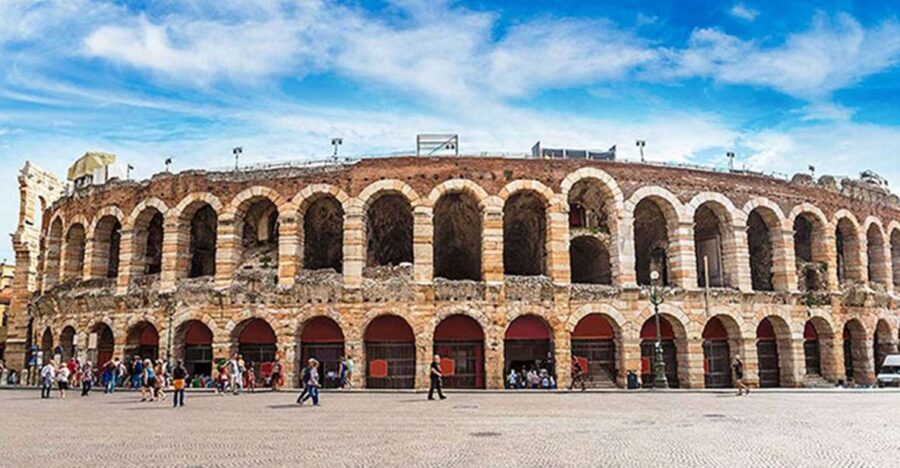
This audioguide includes 21 audio content pieces totaling 63 minutes. You’re essentially buying a compact guided tour you can spread across an afternoon, a morning, or multiple days.
The audio covers these points of interest:
- Verona Introduction
- Arenabasilica of San Zeno
- Basilica of Santa Anastasiа
- Castelvecchio
- Cathedral
- Old Town
- Oltre Adige
- The Wonders of Local Cuisine
Here’s how to think about each one, and how it can help you as you walk.
Verona Introduction
Use this first if you want context fast. An introduction track is often the best way to build a mental map before you start bouncing between monuments. You’ll be told history, points of interest, and curiosities—so you know what you’re looking at, not just where it is.
Practical tip: listen to this at the start of your day, then keep the audio running in your head while you move between sights.
Other self-guided tours in Verona




Arenabasilica of San Zeno
This track focuses on the Basilica of San Zeno area. I like these kinds of audio segments because they don’t just recite facts—they guide your attention. You’ll get history plus “what to notice,” which can turn a quick photo stop into a real moment of understanding.
If you’re trying to keep your walking efficient, this is a track to play right as you approach. That timing usually makes the audio feel most relevant.
Basilica of Santa Anastasiа
Santa Anastasiа is another core stop in the app. The format is the same: history, points of interest, and curiosities. A dedicated track like this helps you avoid the common problem of seeing big churches and remembering none of it later.
If you’re the type who likes to compare details between buildings, use this track soon after San Zeno, then contrast what the audio points out.
Castelvecchio
Castelvecchio is included as its own track. A castle-focused audio piece usually gives you a different lens: not just religious or street-level Verona, but the city seen through architecture and place in the urban fabric.
Practical move: treat this as a “slow down” stop. Even with a self-guided guide, it’s worth giving yourself time to listen fully instead of rushing it.
Cathedral
The Cathedral track helps you understand the site as something more than a pretty exterior. Because the app’s mission is to explain history, points of interest, and curiosities, you should get the sense of what makes this stop important in Verona’s story.
If you tend to feel museum-fatigue, this is a good one to do early or when you’re fresh—cathedrals reward attention.
Old Town
This is the track that can turn wandering into learning. Old Town audio pieces are valuable because they connect the buildings and streets into a narrative you can carry while you walk.
I like using a track like this when I’m in “walk mode” and not sure which landmark to prioritize next. It gives you direction without forcing a rigid route.
Oltre Adige
The guide includes a segment for Oltre Adige. Even without you following a strict schedule, a neighborhood-style audio track helps you notice how one part of town feels different from another.
Practical tip: play it when you cross into the area, then pause the audio when you want to just observe. This keeps the experience from feeling like a lecture.
The Wonders of Local Cuisine
This is the most useful track if you want your sightseeing to connect with eating plans. The app includes local cuisine highlights, and that can help you choose what to try based on what you’ll actually understand while you’re hungry.
Because the app also lets you read the text, you can use this segment as a quick menu-in-your-pocket guide: listen once, then skim later before ordering.
Quiz Section: Learning Without Feeling Like Studying

The audioguide includes a quiz section with short questions about the city. That’s a nice feature for a self-guided format because it nudges you to pay attention—not just collect audio while walking.
I’d use it after you’ve listened to a couple of tracks. It turns the information into something sticky instead of forgetting everything once you step outside.
Price and Value: Is $9 a Good Deal for Verona?

At $9 per person, you’re paying for a lot of flexibility. You’re not buying a single one-time activity. You’re buying:
- 21 audio tracks for a total of 63 minutes
- access in multiple languages
- the ability to listen online or offline
- text access for the audio files
- long usage time with 1365-day validity from first activation
- the option to replay without the guide expiring
So the value depends on how you travel. If you like to roam, this price makes sense because you’ll use it more than once. If you prefer a live guide and don’t want to manage an app, you might feel like you’re doing extra work for information you could get in a group setting.
But for many independent travelers, $9 is a small price for something you can stretch across days.
Practical Listening Tips That Make the Guide Work Better

A self-guided audio guide is simple—until you’re actually out there. Here are practical ways to get a better experience, based on how this app is designed.
- Use earphones for clearer audio and a calmer experience.
- Start with the Verona Introduction so the rest of the stops feel connected.
- When you reach a listed point of interest, listen right then. The audio will feel more “in sync” with what you’re seeing.
- If you miss details, use the text view rather than replaying the whole track.
- If you’re tired, don’t force all 63 minutes in one session. Spread it. The app is meant to be used repeatedly.
Also, since you’re doing everything on your phone, keep your expectations realistic: the experience is shaped by your device’s sound and your comfort using the app outdoors.
Who This Verona Audioguide Fits Best
This works especially well if you:
- want to travel at your own pace and skip fixed group schedules
- like learning in short bursts while walking
- appreciate offline options
- want an audio guide you can revisit long after the trip
It’s less ideal if you:
- strongly prefer live, interactive guiding
- hate dealing with activation codes, app downloads, and smartphone-based navigation
In general, it’s a smart choice for independent travelers who enjoy making their own Verona route.
Should You Book This Verona Audioguide?

Yes, if you want a flexible, smartphone-based way to learn about key Verona stops without collecting tickets or lining up at a meeting point. The combination of 21 audio segments, offline capability, and long 1365-day validity makes the $9 price feel like a practical investment.
Skip it only if you already know you’d rather have a human guide talking to you in real time. Otherwise, this is the kind of tool that turns “I’m just walking around” into “I’m actually paying attention.”
FAQ
FAQ
How much does the Verona TravelMate audioguide cost?
It costs $9 per person.
How long is the audioguide valid after activation?
It is valid for 1365 days from your first activation.
Is there a meeting point to start?
No. There is no meeting point. You download the app and start your experience wherever you prefer.
How many audio tracks are included?
The guide includes 21 audio content items.
What is the total length of the audio?
The total audio content adds up to 63 minutes.
Can I listen offline?
Yes. You can listen online or offline.
Can I read the audio content in the app?
Yes. You may read the text of the audio files in the app.
What languages are available?
The audio is available in French, Italian, German, English, Russian, Chinese, and Spanish.
Where do I find my activation code?
You can find the activation code in your email by opening the activity details and tapping the barcode in the orange frame. The activation code is the 10-digit small number under the barcode. You can also find it through the GetYourGuide app by opening the ticket and tapping the barcode.
Is free cancellation available?
Yes. You can cancel up to 24 hours in advance for a full refund.